Predictive risk analysis and failure prevention
CASQ-it FMEA systematically reduces risks that may arise from potential weak points of a product, process or system. The FMEA software assists you in accordance with the new harmonized AIAG and VDA manual and the existing AIAG and VDA procedures.
Your benefits:
- Systematic failure prevention strategies
- Fast FMEA generation through a knowledge database
- Exports of FMEA knowledge in Control Plan and inspection plans
- Strategic root cause analysis
- Avoidance of recurring failures (lessons learned)
- Control of measures and deadlines
Guidance through structural analysis
The FMEA software systematically guides you through the structural analysis: graphical system networks visualize both the complete product structure down to any depth and the process chain, including the influencing factors. Using template FMEAs, changes can be applied to all connected FMEAs. New specific FMEAs are created based on FMEA templates.
Superordinate function and malfunction network
CASQ-it helps you visualize your functional analysis in transparent networks. The direct linking of functions and features from the design FMEA to the respective step of the process FMEA creates full transparency. This results in a superordinate function and malfunction network that graphically illustrates the interrelationships between product design and process.
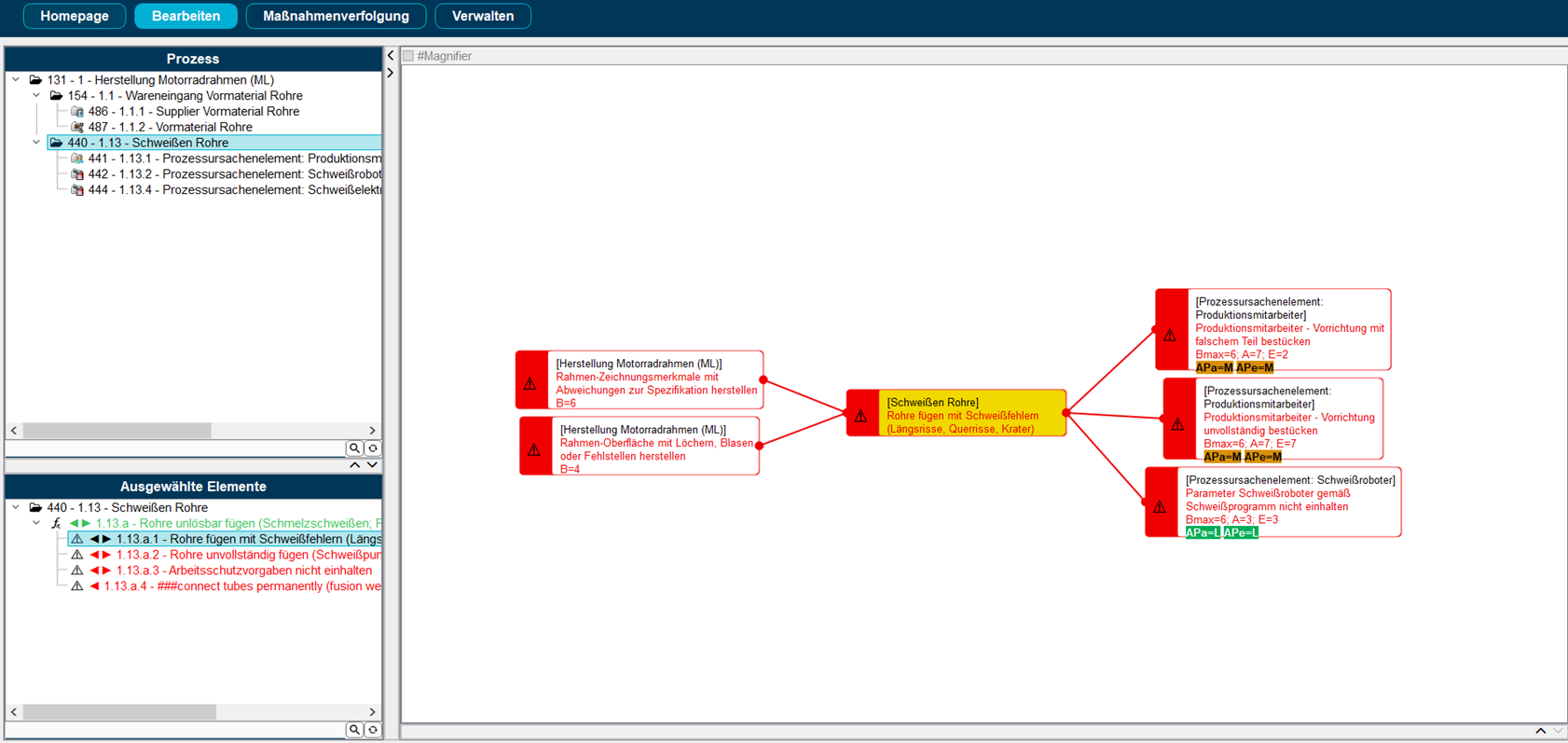 Übersichtliche Darstellung komplexer Inhalte durch intuitive Benutzeroberfläche mit Drag & Drop und einstellbarer Detailtiefe. Mit CASQ-it FMEA können Sie Ihr Team in den Erstellungsprozess einer FMEA einbeziehen.
Direct handover to the control plan
Existing process steps from your FMEA can be passed directly to the control plan with all product features and process parameters, which are further specified in the detailed inspection plans.
Consistent failure chains
The FMEA software systematically identifies and links potential failure causes, impacts and their correlations. This creates consistent failure chains. In the event of a customer complaint, it is immediately visible which additional complaints may be expected.
User-friendly risk assessment
During the risk assessment, the function and malfunction interrelationships with CASQ-it FMEA are assessed in a user-friendly manner via catalog. Graphical failure mode networks provide a visual aid for the root cause analysis.
Interaction with CASQ-it Event Service
The causes with the highest risks mean that action is needed for optimization measures. They are presented compactly in bundled reports. Measures intended to reduce risk will be processed on time, based on the specified responsibilities and processing deadlines in cooperation with the CASQ-it Event Service. Each employee receives a personalized to-do list showing their open tasks. CASQ-it Event Service automatically monitors processing in the background. All measures are updated continuously, and every piece of information is directly accessible by the FMEA moderator. If deadlines shift, the integrated escalation management system automatically sends out email notifications.
Transparent risk management
In CASQ-it, reports, comparative analyses, overviews of measures and control plan process flow charts ensure transparent risk management. The further processing of the results is carried out seamlessly with CASQ-it until the product development process is successfully completed.
Cost reduction and efficiency improvement
With CASQ-it FMEA, you can reduce costs using systematic failure prevention strategies, rapid FMEA creation using a knowledge base, and importing FMEA knowledge into Control Plan and your inspection plans. CASQ-it FMEA increases efficiency through a strategic root cause analysis, application of lessons learned and effective management of actions and dates.
Step 1: Preparation and project planning
Basis for executing the FMEA:
- Define the team
- Schedule the team meetings
- Create a team log
- Define the depth of analysis
- Link the project plan
- Define the header information
- Link to specification documents and customer requirements
Step 2: Structural analysis
Clear structuring according to design and process FMEA:
- Tree representation of the product and process structure
- Map the product structure to any depth
- Graphical user interface for the transparent display of system elements, interfaces and dependencies
- Use existing analyses by means of suggestions of data entered for other FMEAs
- Automatically create a knowledge base
Step 3: Function analysis
Detailed system description with functional diagrams and process steps:
- Link the functions in the network using drag and drop
- Quick link for potential function networks
- Automatically generate functional networks from malfunction networks
- Feature description including tolerance specification
- Mark critical or safety-relevant features with graphic symbols
Step 4: Failure analysis
Graphically supported failure links:
- Failure consequence analysis with malfunction networks
- Directly switchable display of the risks by action priorities (AP) and risk priority numbers (RPN)
- Assign and display malfunction, failure cause and failure consequence
Step 5: Risk assessment
Risk identification and risk assessment in malfunction networks:
- Assess regarding meaning, occurrence and identification by means of defined valuation schemes
- Identify action priority (AP) The risk priority (RPN) can be determined using an appropriate valuation schedule
- Document existing prevention and detection measures
- Collectively assess measures
- Assess the costs of measures
Step 6: Optimization
Measures definition and implementation as well as reassessment:
- Define actions for reducing the risk
- Determine the AP by differentiating the following:
- Initial AP and final AP
- Assign measures to multiple causes
- Monitor measures through a definable search
- Overviews of measures
- Possibility of monitoring measures
- Monitor measures via CASQ-it TMS
- Monitor dates with CASQ-it Event Service
Step 7: Documentation
FMEA print forms:
- Output the forms in xls format for further processing in MS Office applications
- Overviews of measures with initial AP and final AP
- Output the most risky causes, sorted by descending AP
- Output graphic structures and networks
- Access to all co-applicable documents